Nurotech
SEO
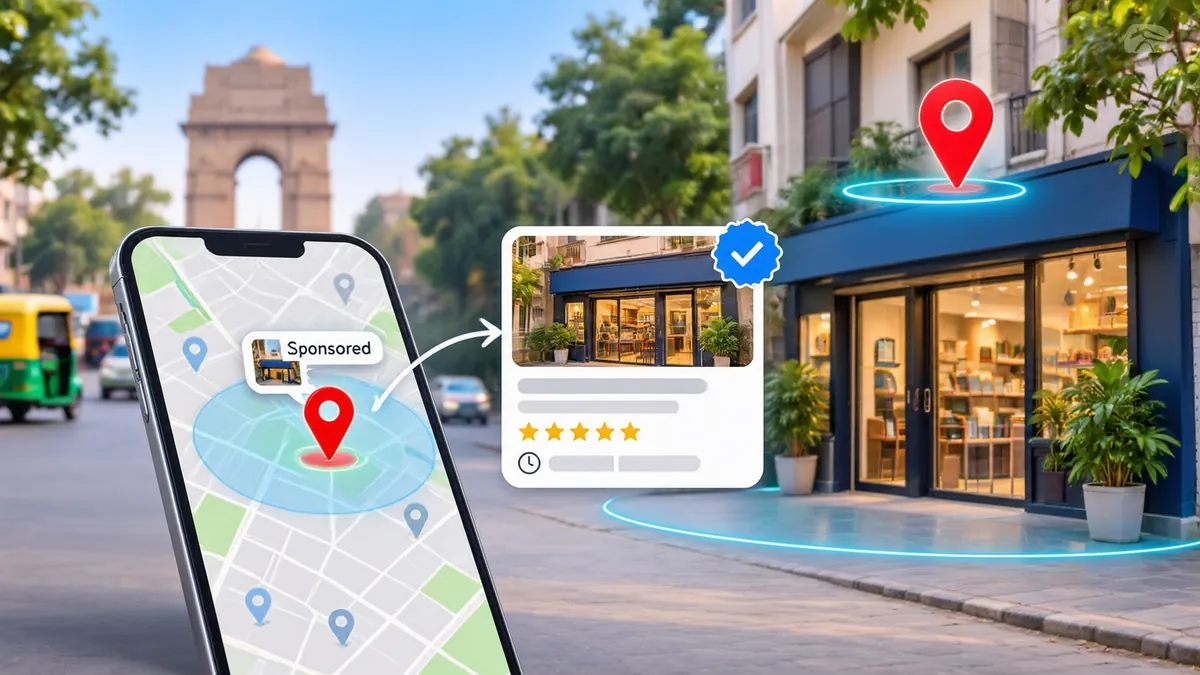
Google Maps ads are not a separate product you buy. They are ordinary Google Ads campaigns that are allowed to show a promoted pin and a "Sponsored" listing on Maps, and Google only lets that happen when your ad account is linked to a verified Google Business Profile through a location asset. Get the profile and the link right, set a tight radius around your market, and a shop in Lajpat Nagar or Karol Bagh can appear at the top of a Maps search for a few rupees a click. Skip either step and the campaign simply runs on Search, with no pin at all.
That's the short version. The rest of this guide covers the India setup step by step, because most of what ranks for this topic today is written for the United States and leans on a product Delhi businesses can't use.
Methodology: for this guide our team read Google's own help pages for location assets, location targeting and Business Profile verification in November 2026, compared the three guides that rank on page 1 in Delhi for "google maps ads", and pulled keyword data from DataForSEO for Delhi and India. Where we give rupee figures, they're worked examples to show the maths, not results from a named client.
Open Google Maps on your phone and type "saree shop near me" in Chandni Chowk. The first one or two results often carry a small "Sponsored" label, and a purple or differently styled pin may appear on the map itself. Those are Maps ads. Tap one and you get the business name, rating, distance, opening hours and buttons for directions or a call.
Behind the scenes, three things have to be true for that listing to appear:
According to Google's help page About location assets, these assets can show your address, a map, or your distance from the person searching, and they're what lets an ad appear on Google Maps. No location asset, no Maps placement. It's that binary.
What Maps ads are not is just as important. They're not the free "map pack" (the three local results under a map on a normal Google search). You can't pay your way into that box; it's ranked organically on relevance, distance and prominence. And they're not Local Services Ads, the "Google Guaranteed" format you'll read about in American guides. We checked Google's Local Services Ads help pages in November 2026 and India wasn't in the list of supported countries. So if a guide tells you to "set up LSA first", it isn't talking to a Delhi business.
Every Maps ad borrows its address, pin location, hours, phone number, photos and star rating from your Google Business Profile. The ad copy you write in Google Ads sits on top of that, but the bit people actually look at on a map comes from the profile. If the profile is weak, the ad is weak, however much you bid.
When we audit a Delhi shop's profile before a paid campaign, these are the checks that matter:
An unverified profile can't be used as a location asset. Google's verification help page lists the methods it may offer, and these days a short video showing your signboard, the street and some proof of business is common. Keep a document ready: a GST certificate, a shop and establishment licence, or an MSME certificate from the government's Udyam Registration portal. In our experience verification can take anywhere from 2 days to 3 weeks, and a rejected video resets the clock. Do this weeks before you plan to spend money.
Delhi addresses are messy. "Shop 14, Block C, Main Market" might match three different lanes on Google's map. Drag the pin to your actual shutter, not the market's centre point. A pin that sits 200 metres off can put you in the wrong locality for radius targeting and send a customer to the wrong gate of a mall.
Your primary category decides which searches your listing is even considered for. A shop that sells mobile accessories but is listed as "Electronics store" may miss "mobile cover shop" searches entirely. Pick the narrowest category that's true, then add secondary categories.
Maps ads show whether you're open now. Wrong hours mean you pay for clicks from people who arrive to a closed shutter. Upload at least 10 real photos (front, inside, products, staff) and keep reviews coming in. A Sponsored pin with a 3.1 rating next to an organic pin with 4.6 is money spent advertising your competitor.
If your profile needs this groundwork, our Google Business Profile optimisation guide for Ghaziabad and East Delhi walks through it for single and multi-location businesses.
Once the profile is verified, the link itself takes about 10 minutes. Here's the path in the current Google Ads interface (Google moves menus around, so the labels may shift slightly):
After the link, give it 24 to 48 hours. Then check the asset's status. "Eligible" is good. "Not eligible" usually points back to the profile: unverified, suspended, or an address Google can't place on the map.
One detail we've seen confuse people: syncing a location asset doesn't by itself guarantee a Maps placement. It makes the campaign eligible. Google still decides, auction by auction, whether to show a Search ad, a Maps ad, both, or neither, based on bid, ad quality and how relevant your listing is to the search.
Both can serve on Maps when a location asset is attached. A Search campaign gives you control: you choose keywords, see search terms and write the ads. Performance Max decides most of that for you and spreads budget across Search, Maps, YouTube, Display and Gmail. Google also offers a store-goals version of Performance Max for businesses that care about footfall.
For a single shop with a budget under ₹30,000 a month, we usually start with a Search campaign. You can see exactly which searches cost money, which matters when every ₹500 counts. Performance Max makes more sense for chains with several outlets and enough conversion data for the bidding to learn from. Either way, the account structure sits inside wider paid search work like the campaigns our performance marketing team in Delhi runs, where Maps is one placement rather than a separate channel.
Location targeting is where Delhi businesses waste the most money. A campaign set to "Delhi" covers roughly 1,484 square kilometres. A customer in Narela isn't driving to your bakery in Hauz Khas, and Google will happily charge you for their click anyway.
Google's location targeting help page explains the options: you can target cities, postal codes, or a radius around an address. For Maps ads, the radius around your own pin is usually the right tool.
It depends on how far a customer will travel for what you sell. Rough starting points we use:
| Type of business | Starting radius | Why |
|---|---|---|
| Chemist, bakery, salon, tiffin service | 1.5 to 3 km | People choose the closest open option |
| Restaurant, gym, coaching centre | 3 to 5 km | Worth a short auto or metro ride |
| Clinic, specialist repair, furniture showroom | 5 to 10 km | Higher ticket, people travel for trust |
| Wholesale market (Sadar Bazaar, Chandni Chowk) | 10 to 25 km plus NCR cities | Buyers come from across NCR |
Delhi traffic matters more than the straight-line distance. Three kilometres across the Ring Road at 6 pm can take 40 minutes. If you're near a river crossing or a big flyover, draw the radius smaller on that side by using two or three overlapping circles, or by targeting specific PIN codes instead.
Under the location options there's a setting that decides whether Google shows your ad to people in your area or to people who are interested in your area. The default includes interest. For a shop, switch it to "Presence: people in or regularly in your targeted locations". Otherwise someone in Mumbai searching "best chole bhature Delhi" can trigger your Karol Bagh ad and cost you ₹15 for a click that will never walk in.
Exclude areas you can't serve. A home-delivery kitchen in Dwarka might exclude anything across the Yamuna. If you have a radius of 5 km, you can also raise bids by 20% or 30% for the closest 2 km, where people are most likely to visit the same day.
Short answer: the free map pack is the foundation and the ad is the top-up. Here's how they differ.
The organic map pack costs nothing per click, but you can't buy a position in it. Google ranks those three listings on how relevant your profile is to the search, how close you are to the searcher, and how prominent your business is (reviews, links, mentions across the web). Being 4 km away from someone puts you at a real disadvantage against a shop 400 metres away, however good your profile is.
A Maps ad gets around distance. Within your targeting radius, you can appear above the organic results even if a competitor is physically closer. That's useful when you're new and don't yet have the review count to compete, when you're in a crowded market lane with 20 near-identical shops, or for searches where you want visibility for a few weeks, like Diwali gifting or wedding season.
Where the two meet: the ad pulls its rating and photos from the same profile that powers your organic ranking. Work on the profile lifts both. That's why we don't treat Maps ads as a fix for a weak listing. When we take on local SEO for a Delhi shop, the profile and review work comes first, and paid Maps placements only start once the listing is strong enough to convert the clicks.
If you're a small business still deciding where to put a limited budget, our guide to local SEO for small businesses in Delhi covers the free side in more detail.
You pay per click, the same as any Search ad. There's no separate Maps price list. Per Google's billing model, you're charged when someone clicks through to your listing, taps for directions, taps to call, or clicks to your website from the ad, and you set a daily budget that caps spend.
Our data from DataForSEO in November 2026 showed an average cost per click of about $1.52 (roughly ₹128) for the keyword "google maps ads" itself. That's the price advertisers pay to reach people searching for advertising, though, not what a shop pays. The searches that matter to you are product and service searches like "dentist near me" or "kurta shop Lajpat Nagar", and those vary a lot. In our experience, very local, low-competition searches in Delhi can cost ₹5 to ₹20 a click, while clinics, lawyers and real estate often go above ₹60.
Say a salon in Rajouri Garden sets a ₹500 daily budget, which is about ₹15,000 over 30 days. Suppose the average click costs ₹12. That buys around 1,250 clicks a month. If 1 in 10 of those people taps for directions or calls, that's 125 actions. If 40% of those actually book, that's 50 customers. With an average bill of ₹1,200, those 50 visits are worth ₹60,000 in revenue for ₹15,000 in ad spend.
Now change one number. If the profile has a 3.4 rating and only 1 in 25 clickers acts, actions fall to 50 and bookings to 20. Revenue drops to ₹24,000 for the same ₹15,000. The ad didn't change. The profile did. That's the whole argument for fixing the listing first.
Don't forget the 18% GST that Google charges on top of ad spend in India. On a ₹15,000 budget, that's ₹2,700 extra, which you can only offset if you claim input credit.
Clicks alone won't tell you much. In Google Ads, add these columns to your campaign view: Store visits (only appears once Google has enough data, which small shops often won't reach), Get directions and Calls from location assets, and the click type report, which splits website clicks from Maps clicks.
In Business Profile Performance, check direction requests and calls month on month. A useful habit: ask every walk-in customer for 2 weeks, "How did you find us?" and tally the answers. It's crude, but it's the only way to know whether the people tapping "directions" actually reached your counter.
Give a new campaign at least 4 weeks before judging it. The first 7 to 10 days are mostly Google working out who to show the ad to.
A person searching on Maps is usually close by and ready to move. Your keywords and ad text should reflect that, not read like a brand campaign.
Lean on "near me" and locality phrases: "optician near me", "AC repair Mayur Vihar", "momos Lajpat Nagar". Add the product people actually type, in the spelling they use. Delhi searches mix Hindi and English freely, so "kurti shop", "chashma shop" and "mithai shop near me" all deserve a place. Start with phrase match for 20 to 40 keywords, not broad match, so a small budget isn't spread across loosely related searches.
Say the things that decide a visit in the next hour. Open till 10 pm. Parking behind the shop. 2 minutes from Rajiv Chowk metro Gate 7. Home delivery within 3 km. Prices from ₹299. These beat "quality service since 1998" every time, because the person is comparing you with the pin next door, not reading your history.
Add call and price assets too. A call asset puts a phone button on the ad, and on mobile a lot of local searchers would rather ring and ask "do you have it in stock?" than walk over and find out.
Run the ads only while you can serve the customer. A shop that opens at 11 am and shuts at 9 pm gains nothing from clicks at 2 am. Set the ad schedule to start about 30 minutes before opening, so early searchers can plan their trip, and to stop about an hour before closing. Then check the hour-of-day report after 4 weeks and cut the slots that cost money but bring no calls or direction requests.
A chain with outlets in Rohini, Pitampura and Janakpuri needs each one verified as its own Business Profile, with its own correct pin, phone number and hours. Sync all of them into the same location asset, and Google picks the outlet nearest to each searcher when it shows the ad.
Budget is where multi-outlet setups go wrong. If one campaign covers all three outlets, the busiest area tends to swallow the spend and the newest branch gets almost nothing. Split it into one campaign per outlet, each with its own radius and daily budget, once you're spending more than about ₹1,000 a day in total. Use Business Profile labels such as "rohini" or "west-delhi" to filter which listing each campaign syncs.
Watch for radius overlap. Pitampura and Rohini sit about 4 km apart, so two 5 km circles overlap heavily and you end up bidding against yourself. Shrink the circles or split the shared area by PIN code so each outlet owns its own patch.
These are the problems we've seen most often when Delhi businesses ask why their Maps ads "aren't showing" or "aren't working".
The profile and the ad account are owned by different people. The link request goes to someone who's left the business, or to an old agency. Sort out profile ownership before anything else.
Targeting all of Delhi from one shop. A 1,484 km² net for a business whose customers live within 3 km. Most of the budget goes on clicks from people who will never visit.
Leaving "interest" targeting on. People outside your area see the ad because they searched for your area's name.
Wrong or missing hours. Holidays like Diwali, Holi and Sunday market closures need special hours updated in the profile. Otherwise Maps shows you as open and you pay for a wasted trip.
Duplicate listings. Two profiles for the same shop (often one created by a customer years ago) split reviews and can stop the asset from syncing cleanly. Request removal of the duplicate through Business Profile support.
Expecting Performance Max to fix a tiny budget. With ₹300 a day spread across six Google networks, very little of it reaches Maps, and the reporting won't tell you clearly what happened.
No negative keywords. A furniture shop paying for "furniture shop job vacancy" and "second hand furniture free" is common. Check the search terms report every week for the first 2 months and add negatives.
Judging by clicks instead of visits. A cheap click that never reaches the shop is the most expensive kind.
If you take one thing from this guide, make it the order of work: verify and clean up the Business Profile, link it as a location asset, draw a tight radius, then spend. Most failed Maps campaigns we look at skipped the first step and tried to fix the result with a bigger budget.
Nurotech, a unit of Yogya Infomedia Limited, runs paid search and local SEO for businesses across Delhi NCR. If you'd like us to check your profile and account setup before you spend on Maps ads, start with our performance marketing services page and get in touch.
For background on how the ad platform itself works, the Google Ads entry on Wikipedia gives a neutral history of the product and its auction model.
FAQs
Fill out the form or call us — let’s find where your next growth comes from.
9659 634 634 [email protected]Free Growth Audit
See exactly where your traffic, leads and ROAS are leaking — and how to fix it. A senior Nurotech strategist reviews your website, SEO and ads. Free, no obligation.
No spam. We reply within 1 business day.